

 极客观点
极客观点 项目管理
项目管理 HarmonyOS


刚刚在微博上看到这个,一直没弄明白Bash的颜色是怎么一个规则?
怎么控制颜色,打印出有规则的颜色?
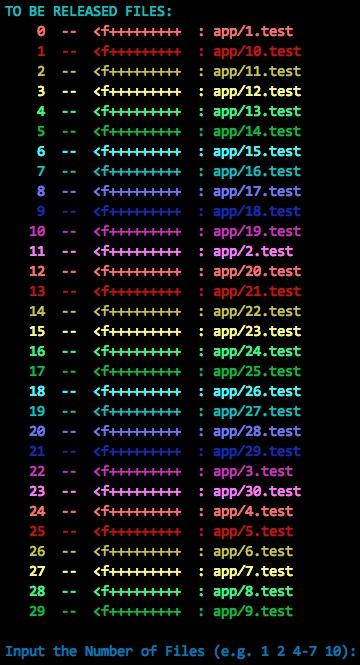


用的是Escape Sequence:
http://en.wikipedia.org/wiki/Escape_s...
至于具体怎么打印颜色,可参考
https://wiki.archlinux.org/index.php/...
http://www.linuxselfhelp.com/howtos/B...


对echo做过一个简单包装。。。
第一个GitHub上的作业。。。
只支持ascii颜色。。。
cecho,直接把readme拷贝过来了。
cecho
Colorful echo for unix-like shell ( ascii color only )
Overview
A light, self-adapting wrapper of echo, with color flags of foreground, background and action ( highlight, underline, blink ... ) . With it, you can easily colorize your output of command and shell script.
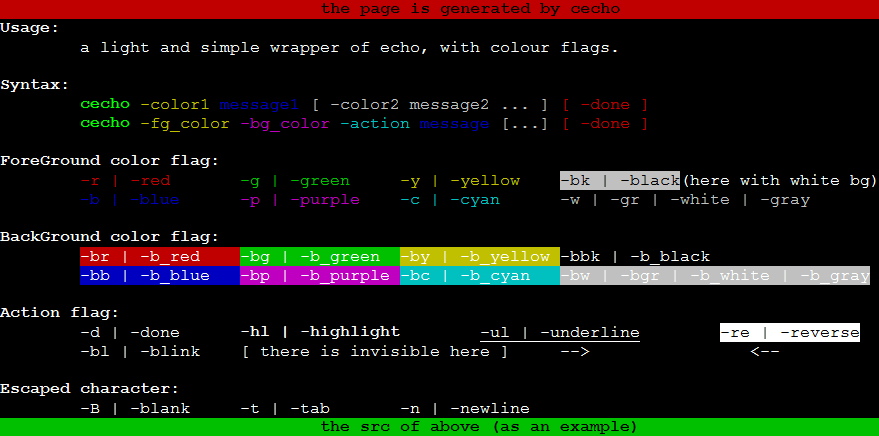
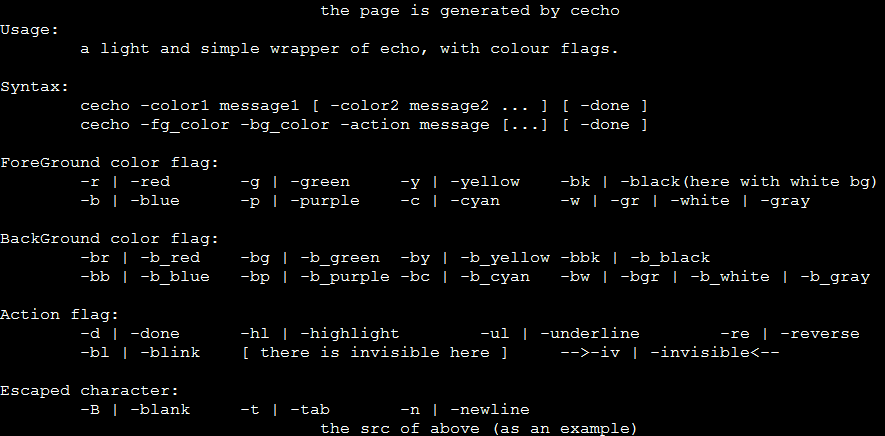
Screenshot
Active
Inactive
Install
Before use cecho, simply source it in your .zshrc, or any shell script wanted to colorize like this:
source /path/to/cecho.sh
Usage
Support multi-string in one command:
cecho -color1 message1 [ -color2 message2 ... ] [ -done ]
Support setting foreground, background and action
cecho -fg_color -bg_color -action message [...] [ -done ]
All flags have two formats, short for convenience, long for readability.
The short formats is easily memorized, which are nearly just the heads the long formats.
Foreground color flag
| short | long |
|---|---|
| -r | -red |
| -g | -green |
| -y | -yellow |
| -b | -blue |
| -p | -purple |
| -c | -cyan |
| -w | -white |
| -gr | -gray |
| -bk | -black |
Background color flag
| short | long |
|---|---|
| -br | -b_red |
| -bg | -b_green |
| -by | -b_yellow |
| -bb | -b_blue |
| -bp | -b_purple |
| -bc | -b_cyan |
| -bw | -b_white |
| -bgr | -b_gray |
| -bbk | -b_black |
Action flag
| short | long |
|---|---|
| -d | -done |
| -hl | -highlight |
| -ul | -underline |
| -re | -reverse |
| -bl | -blink |
| -iv | -invisible |
Escaped character
| short | long |
|---|---|
| -B | -blank |
| -t | -tab |
| -n | -newline |
Functional
| short | long |
|---|---|
| -h | -help,--help |
Example
set fg to red:
cecho -r "hello world ! "
or
cecho -red "hello world ! "
or
cecho -r hello -B world -B !
blank & tab & newline
cecho -r -t hello -B world -n !
set fg to red, bg to yellow, action to highlight and underline:
cecho -r -by -hl "hello world ! "
set [ red, yellow, highlight & underline ] for "hello", [ cyan, red, reverse ] for "world", [ green, black, blink ] for "!" :
cecho -r -by -hl -ul hello -d -B -c -br -re world -d -B -g -bl !
More examples in help file triggered with this command
cecho -h
That colorful help page is generated by cecho .
Useful Variables
CECHO_IS_IMPORTED
Once you have sourced cecho, CECHO_IS_IMPORTED=1 will be defined.
That meams you can check this var CECHO_IS_IMPORTED to confirm if in a no_cecho env or not:
Exp: Sence 2
CECHO_IS_INACTIVE
When you use cecho but want it inactive temply, set CECHO_IS_INACTIVE=1 before calling cecho.
Note: color and action can be disable by CECHO_IS_INACTIVE, but we keep return, blank and tab active, as you wish.
Sence
1 - I want my script outputs to file/pipe without color_ctrl chars
Needn't do any change, cecho can self-adapting this: colorful for stdout, non-colorful for file/pipe.
2 - My script maybe runs in both "no-cecho env" and "cecho env"
Unfortunately, you have to write your script like this:
if [ -z "$CECHO_IS_IMPORTED" ]
then
echo hello world
else
cecho -r -bg -hl hello -B world
fi
Or shortly:
[ -z "$CECHO_IS_IMPORTED" ] && echo "hello world" || cecho -r -bg -hl hello -B world
3 - My script uses cecho but I want it disabled temply
CECHO_IS_INACTIVE=1
cecho -r -bg -hl hello world # <-- now cecho is inactive
CECHO_IS_INACTIVE=
cecho -r -bg -hl hello world # <-- now cecho is active
Advanced
- Action flag
-d( same as-done) will turn off all settings ( fg, bg and action ), Thus, in single command, you have to set flags again to make it work well once there are other strings after-d. - Some special characters ( with centain format ) don't work well, such as
cecho "!". It's due toecho... usececho '!'orcecho !instead. - It's not necessary use
-dat the begin/end of commands,cechodo it automatically. - Actions can overlaied.
What's more
Another C version project is coprintf.
Thanks
Thanks to https://github.com/jonhiggs/cecho, when I completed cecho script and try uploading it to github I found this -- with same name and almost same functions ... and then, I got the way to build table in README.md from there.
撰写回答
你尚未登录,登录后可以
- 和开发者交流问题的细节
- 关注并接收问题和回答的更新提醒
- 参与内容的编辑和改进,让解决方法与时俱进
Bash Shell定义文字颜色有三个参数:Style,Frontground和Background,每个参数有7个值,意义如下:
其中,+30表示前景色,+40表示背景色
这里提供一段代码可以打印颜色表:
#/bin/bash
for STYLE in 0 1 2 3 4 5 6 7; do
  for FG in 30 31 32 33 34 35 36 37; do
    for BG in 40 41 42 43 44 45 46 47; do
      CTRL="\033[${STYLE};${FG};${BG}m"
      echo -en "${CTRL}"
      echo -n "${STYLE};${FG};${BG}"
      echo -en "\033[0m"
    done
    echo
  done
  echo
done
# Reset
echo -e "\033[0m"