
Spring-Cloud Euraka是Spring Cloud集合中一个组件,它是对Euraka的集成,用于服务注册和发现。Eureka是Netflix中的一个开源框架。它和 zookeeper、Consul一样,都是用于服务注册管理的,同样,Spring-Cloud 还集成了Zookeeper和Consul。
搭建eureka服务注册中心
引入以下依赖
<dependencies>
        <dependency>
            <groupId>org.springframework.boot</groupId>
            <artifactId>spring-boot-starter</artifactId>
        </dependency>
        <!-- 最新版的 eureka 服务端包 -->
        <dependency>
            <groupId>org.springframework.cloud</groupId>
            <artifactId>spring-cloud-starter-netflix-eureka-server</artifactId>
        </dependency>
    </dependencies>
    <!-- SpringCloud依赖,起到管理版本的作用 -->
    <dependencyManagement>
        <dependencies>
            <dependency>
                <groupId>org.springframework.cloud</groupId>
                <artifactId>spring-cloud-dependencies</artifactId>
                <version>Hoxton.SR9</version>
                <type>pom</type>
                <scope>import</scope>
            </dependency>
        </dependencies>
    </dependencyManagement>
Spring Cloud 和 Spring Boot 之间版本对应关系
| Release Train | Boot Version |
|---|---|
| 2020.0.x aka Ilford | 2.4.x |
| Hoxton | 2.2.x, 2.3.x (Starting with SR5) |
| Greenwich | 2.1.x |
| Finchley | 2.0.x |
| Edgware | 1.5.x |
| Dalston | 1.5.x |
在启动类上添加@EnableEurekaServer注解,表明这是一个Eureka服务端
@SpringBootApplication
@EnableEurekaServer
public class SpringCloudEurekaApplication {

    public static void main(String[] args) {
        SpringApplication.run(SpringCloudEurekaApplication.class, args);
    }

}
在application.properties中添加一些配置
server.port=8080
spring.application.name=Eureka-Server
# 指定了Eureka服务端的IP
eureka.instance.hostname=localhost
eureka.instance.statusPageUrl=http://${eureka.instance.hostname}:${server.port}/info
eureka.instance.healthCheckUrl=http://${eureka.instance.hostname}:${server.port}/health
eureka.instance.homePageUrl=http://${eureka.instance.hostname}/
# 表示是否将服务注册到Eureka服务端,由于自身就是Eureka服务端,所以设置为false
# eureka.client.register-with-eureka=false
# 表示是否从Eureka服务端获取服务信息,因为这里只搭建了一个Eureka服务端,并不需要从别的Eureka服务端同步服务信息,所以这里设置为false
# eureka.client.fetch-registry=false
# 指定Eureka服务端的地址,默认值为http://localhost:8761/eureka 指定Eureka服务端的地址为另外一个Eureka服务端的地址8081
eureka.client.serviceUrl.defaultZone=http://${eureka.instance.hostname}:${server.port}/eureka/
# 用于定义服务续约任务的调用间隔时间,默认30秒
eureka.client.serviceUrl.registry-fetch-interval-seconds=5
配置完毕后启动服务,访问http://localhost:8080/
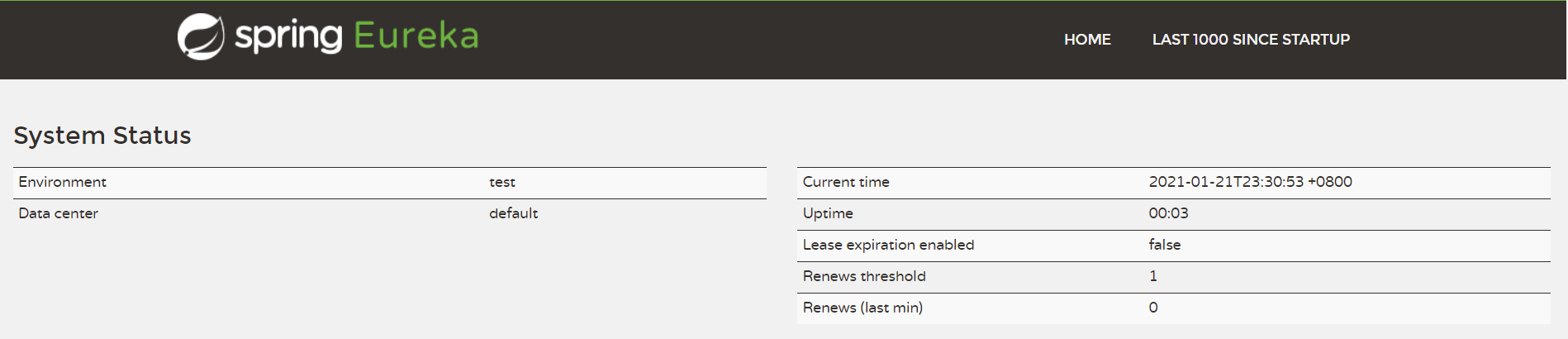
由于还没有Eureka客户端将服务注册进来,所以Instances currently registered with Eureka列表是空的
搭建provider服务提供者
引入以下依赖
<dependencies>
        <dependency>
            <groupId>org.springframework.boot</groupId>
            <artifactId>spring-boot-starter</artifactId>
        </dependency>
        <dependency>
            <groupId>org.springframework.cloud</groupId>
            <artifactId>spring-cloud-starter-netflix-eureka-client</artifactId>
        </dependency>
        <dependency>
            <groupId>org.springframework.boot</groupId>
            <artifactId>spring-boot-starter-web</artifactId>
        </dependency>
        <!-- 监控管理 -->
        <dependency>
            <groupId>org.springframework.boot</groupId>
            <artifactId>spring-boot-starter-actuator</artifactId>
        </dependency>
    </dependencies>
    <!-- SpringCloud依赖,起到管理版本的作用 -->
    <dependencyManagement>
        <dependencies>
            <dependency>
                <groupId>org.springframework.cloud</groupId>
                <artifactId>spring-cloud-dependencies</artifactId>
                <version>Hoxton.SR9</version>
                <type>pom</type>
                <scope>import</scope>
            </dependency>
        </dependencies>
</dependencyManagement>在启动类上加@EnableDiscoveryClient注解,表明这是一个Eureka客户端
@SpringBootApplication
@EnableDiscoveryClient
public class SpringCloudProviderApplication {

    public static void main(String[] args) {
        SpringApplication.run(SpringCloudProviderApplication.class, args);
    }

}
接着编写一个TestController,对外提供一些REST服务
@RestController
public class TestController {
    @GetMapping("/hello")
    public String hello() {
        return "hello world";
    }
}
在application.properties中添加一些配置
# 指定了服务的端口为8081
server.port=8082
# 指定服务名称为Server-Provider,后续服务消费者要获取上面TestController中接口的时候会用到这个服务名
spring.application.name=Server-Provider
# 虽然这两个配置的默认值就是true,但这里还是显式配置下,使Eureka客户端的功能更为直观(即向服务端注册服务并定时从服务端获取服务缓存到本地)
eureka.client.register-with-eureka=true
eureka.client.fetch-registry=true
# 指定Eureka服务端的地址,这里为上面定义的Eureka服务端地址
eureka.client.serviceUrl.defaultZone=http://localhost:8080/eureka/,http://localhost:8081/eureka/
# 访问路径可以显示IP地址
eureka.instance.prefer-ip-address=true
配置好后,启动Eureka-Client,可以从控制台中看到注册成功的消息
Registered Applications size is zero : true
Application version is -1: true
Getting all instance registry info from the eureka server
The response status is 200
Starting heartbeat executor: renew interval is: 30
InstanceInfoReplicator onDemand update allowed rate per min is 4
Discovery Client initialized at timestamp 1611244216061 with initial instances count: 0
Registering application SERVER-PROVIDER with eureka with status UP
Saw local status change event StatusChangeEvent [timestamp=1611244216076, current=UP, previous=STARTING]
DiscoveryClient_SERVER-PROVIDER/DESKTOP-7LUOFJF.lan:Server-Provider:8081: registering service...
Tomcat started on port(s): 8081 (http) with context path ''
Updating port to 8081
DiscoveryClient_SERVER-PROVIDER/DESKTOP-7LUOFJF.lan:Server-Provider:8081 - registration status: 204
再次访问http://localhost:8082/,可看到服务列表里已经出现了名字为Server-providerde服务了

UP表示在线的意思(如果Eureka客户端正常关闭,那么这里的状态将变为DOWN),点击后面的链接http://192.168.68.233:8081/actuator/info将访问该服务的/info接口:
{"app":{"name":"Server-Provider"}}这时候关闭Eureka客户端,再次刷新http://localhost:8080/
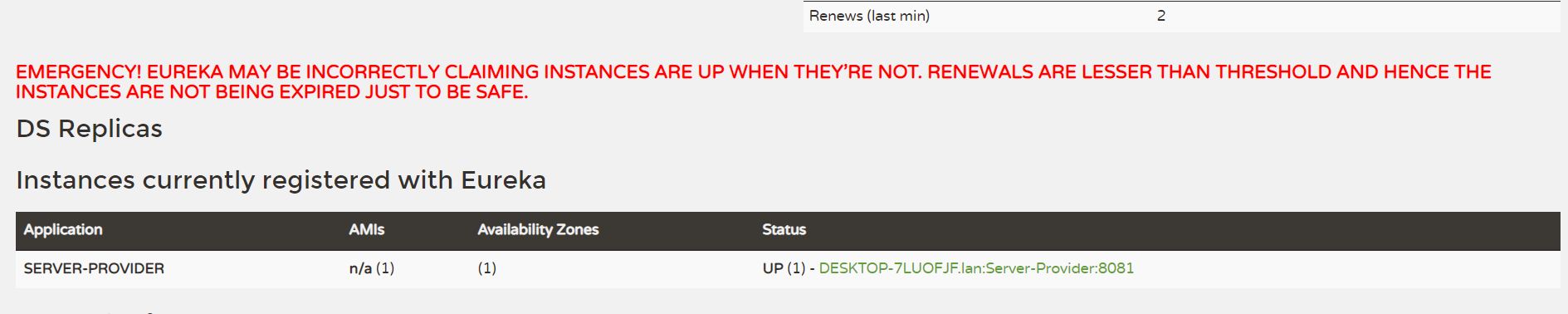
可看到虽然Eureka客户端已经关闭了,但是Eureka服务端页面的服务服务列表中依然还有该服务,并且页面红色文字提示
EMERGENCY! EUREKA MAY BE INCORRECTLY CLAIMING INSTANCES ARE UP WHEN THEY’RE NOT. RENEWALS ARE LESSER THAN THRESHOLD AND HENCE THE INSTANCES ARE NOT BEING EXPIRED JUST TO BE SAFE.大致意思是Eureka已经进入了保护模式。微服务在部署之后可能由于网络问题造成Eureka客户端无法成功的发送心跳给Eureka服务端,这时候Eureka服务端认定Eureka客户端已经挂掉了,虽然实际上Eureka客户端还在正常的运行着。而保护模式就是为了解决这个问题,即当Eureka服务端在短时间内同时丢失了过多的Eureka客户端时,Eureka服务端会进入保护模式,不去剔除这些客户端。因为我们这里只部署了一个Eureka客户端服务,所以关闭客户端后满足“短时间内丢失过多Eureka客户端”的条件。
在开发中可以先将保护模式给关了,我们在Eureka服务端加上一条配置
eureka.server.enable-self-preservation= false开启服务监控actuator
引入以下依赖
<dependency>
    <groupId>org.springframework.boot</groupId>
    <artifactId>spring-boot-starter-web</artifactId>
</dependency>
<dependency>
    <groupId>org.springframework.boot</groupId>
    <artifactId>spring-boot-starter-actuator</artifactId>
</dependency>
在application.properties中添加一些配置
# 启用监控
# 开放所有端点health,info,metrics,通过actuator/+端点名就可以获取相应的信息。默认打开health和info,metrics默认不开放
management.endpoints.web.exposure.include=*
#未开启actuator/health时,我们获取到的信息是{"status":"UP"},status的值还有可能是 DOWN。开启后打印详细信息
management.endpoint.health.show-details=always
info.app.name=Server-Provider
访问路径
localhost根据自己部署的服务器IP、主机名访问。 info、health为默认开放,metrics默认不开放
- 心跳检查 http://localhost:8081/actuator/info
- 健康检查 http://localhost:8081/actuator/health
- 指标 http://localhost:8081/actuator/metrics
Eureka集群
ureka服务端充当了重要的角色,所有Eureka客户端都将自己提供的服务注册到Eureka服务端,然后供所有服务消费者使用。如果单节点的Eureka服务端宕机了,那么所有服务都无法正常的访问,这必将是灾难性的。为了提高Eureka服务端的可用性,我们一般会对其集群部署,即同时部署多个Eureka服务端,并且可以相互间同步服务。
在搭建Eureka服务端的时候我们曾把下面两个配置给关闭了
eureka.client.register-with-eureka=false

eureka.client.fetch-registry=false
实际上在Eureka集群模式中,开启这两个参数可以让当前Eureka服务端将自己也作为服务注册到别的Eureka服务端,并且从别的Eureka服务端获取服务进行同步。所以这里我们将这两个参数置为true(默认就是true),下面开始搭建Eureka服务端集群,为了简单起见这里只搭建两个节点的Eureka服务端集群。
两个applications.properties配置如下
- 8080端口的Eureka服务端
server.port=8080
spring.application.name=Eureka-Server
# 指定了Eureka服务端的IP
eureka.instance.hostname=localhost
eureka.instance.statusPageUrl=http://${eureka.instance.hostname}:${server.port}/info
eureka.instance.healthCheckUrl=http://${eureka.instance.hostname}:${server.port}/health
eureka.instance.homePageUrl=http://${eureka.instance.hostname}/
# 表示是否将服务注册到Eureka服务端,由于自身就是Eureka服务端,所以设置为false
# eureka.client.register-with-eureka=false
# 表示是否从Eureka服务端获取服务信息,因为这里只搭建了一个Eureka服务端,并不需要从别的Eureka服务端同步服务信息,所以这里设置为false
# eureka.client.fetch-registry=false
# 指定Eureka服务端的地址,默认值为http://localhost:8761/eureka 指定Eureka服务端的地址为另外一个Eureka服务端的地址8081
eureka.client.serviceUrl.defaultZone=http://${eureka.instance.hostname}:8081/eureka/
# 用于定义服务续约任务的调用间隔时间,默认30秒
eureka.client.serviceUrl.registry-fetch-interval-seconds=5
# 关闭保护模式
eureka.server.enable-self-preservation=false- 8081端口的Eureka服务端
server.port=8081
spring.application.name=Eureka-Server
# 指定了Eureka服务端的IP
eureka.instance.hostname=localhost
eureka.instance.statusPageUrl=http://${eureka.instance.hostname}:${server.port}/info
eureka.instance.healthCheckUrl=http://${eureka.instance.hostname}:${server.port}/health
eureka.instance.homePageUrl=http://${eureka.instance.hostname}/
# 表示是否将服务注册到Eureka服务端,由于自身就是Eureka服务端,所以设置为false
# eureka.client.register-with-eureka=false
# 表示是否从Eureka服务端获取服务信息,因为这里只搭建了一个Eureka服务端,并不需要从别的Eureka服务端同步服务信息,所以这里设置为false
# eureka.client.fetch-registry=false
# 指定Eureka服务端的地址,默认值为http://localhost:8761/eureka 指定Eureka服务端的地址为另外一个Eureka服务端的地址8080
eureka.client.serviceUrl.defaultZone=http://${eureka.instance.hostname}:8080/eureka/
# 用于定义服务续约任务的调用间隔时间,默认30秒
eureka.client.serviceUrl.registry-fetch-interval-seconds=5
# 关闭保护模式
eureka.server.enable-self-preservation=false
搭建consumer服务消费者
Eureka客户端即是服务提供者,也是服务消费者,即自身的接口可能被别的服务访问,同时也可能调用别的服务接口
引入一下依赖
<dependencies>
        <dependency>
            <groupId>org.springframework.boot</groupId>
            <artifactId>spring-boot-starter</artifactId>
        </dependency>
        <dependency>
            <groupId>org.springframework.cloud</groupId>
            <artifactId>spring-cloud-starter-netflix-eureka-client</artifactId>
        </dependency>
        <dependency>
            <groupId>org.springframework.boot</groupId>
            <artifactId>spring-boot-starter-web</artifactId>
        </dependency>
    </dependencies>
    <!-- SpringCloud依赖,起到管理版本的作用 -->
    <dependencyManagement>
        <dependencies>
            <dependency>
                <groupId>org.springframework.cloud</groupId>
                <artifactId>spring-cloud-dependencies</artifactId>
                <version>Hoxton.SR9</version>
                <type>pom</type>
                <scope>import</scope>
            </dependency>
        </dependencies>
</dependencyManagement>在入口类中加入@EnableDiscoveryClient注解用于发现服务和注册服务,并配置一个RestTemplate Bean,然后加上@LoadBalanced注解来开启负载均衡
@SpringBootApplication
@EnableDiscoveryClient
public class SpringCloudConsumerApplication {

    @Bean
    @LoadBalanced
    RestTemplate restTemplate() {
        return new RestTemplate();
    }

    public static void main(String[] args) {
        SpringApplication.run(SpringCloudConsumerApplication.class, args);
    }

}
编写一个TestController,用于消费服务
@RestController
public class TestController {
    @Autowired
    private RestTemplate restTemplate;

    /**
     * 注入了RestTemplate,getInfo中使用RestTemplate对象均衡的去获取服务并消费。
     * 可以看到我们使用服务名称(Server-Provider)去获取服务的,而不是使用传统的IP加端口的形式。
     * 这就体现了使用Eureka去获取服务的好处,我们只要保证这个服务名称不变即可,IP和端口不再是我们关心的点
     *
     * @return
     */
    @GetMapping("/info")
    public String getInfo() {
        return this.restTemplate.getForEntity("http://Server-Provider/hello", String.class).getBody();
    }
}
在application.properties中添加一些配置
# 指定了服务的端口为8083
server.port=8083
# 指定服务名称为Server-Consumer,后续服务消费者要获取上面TestController中接口的时候会用到这个服务名
spring.application.name=Server-Consumer
# 虽然这两个配置的默认值就是true,但这里还是显式配置下,使Eureka客户端的功能更为直观(即向服务端注册服务并定时从服务端获取服务缓存到本地)
eureka.client.register-with-eureka=true
eureka.client.fetch-registry=true
# 指定Eureka服务端的地址,这里为上面定义的Eureka服务端地址
eureka.client.serviceUrl.defaultZone=http://localhost:8080/eureka/,http://localhost:8081/eureka/
# 访问路径可以显示IP地址
eureka.instance.prefer-ip-address=true
启动该项目,访问http://localhost:8083/info

Eureka添加认证
出于安全的考虑,我们可能会对Eureka服务端添加用户认证的功能。我们在Eureka-Server引入Spring-Security依赖
<dependency>
    <groupId>org.springframework.boot</groupId>
    <artifactId>spring-boot-starter-security</artifactId>
</dependency>
然后在application.yml中配置用户名和密码
spring.security.user.name=admin
spring.security.user.password=123456Eureka服务端配置了密码之后,所有eureka.client.serviceUrl.defaultZone的配置也必须配置上用户名和密码,格式为:eureka.client.serviceUrl.defaultZone=http://${userName}:${password}@${hosetname}:${port}/eureka/,如:
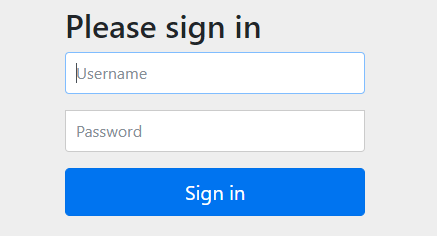
eureka.client.serviceUrl.defaultZone=http://admin:123456@${eureka.instance.hostname}:8080/eureka/重新打包并部署后,访问http://localhost:8080/,页面将弹出验证窗口,输入用户名和密码后即可访问
Eureka配置
Eureka中常用的配置选项及代表的含义
| 配置 | 含义 | 默认值 |
|---|---|---|
| eureka.client.enabled | 是否启用Eureka Client | true |
| eureka.client.register-with-eureka | 表示是否将自己注册到Eureka Server | true |
| eureka.client.fetch-registry | 表示是否从Eureka Server获取注册的服务信息 | true |
| eureka.client.serviceUrl.defaultZone | 配置Eureka Server地址,用于注册服务和获取服务 | http://localhost:8761/eureka |
| eureka.client.registry-fetch-interval-seconds | 默认值为30秒,即每30秒去Eureka Server上获取服务并缓存 | 30 |
| eureka.instance.lease-renewal-interval-in-seconds | 向Eureka Server发送心跳的间隔时间,单位为秒,用于服务续约 | 30 |
| eureka.instance.lease-expiration-duration-in-seconds | 定义服务失效时间,即Eureka Server检测到Eureka Client木有心跳后(客户端意外下线)多少秒将其剔除 | 90 |
| eureka.server.enable-self-preservation | 用于开启Eureka Server自我保护功能 | true |
| eureka.client.instance-info-replication-interval-seconds | 更新实例信息的变化到Eureka服务端的间隔时间,单位为秒 | 30 |
| eureka.client.eureka-service-url-poll-interval-seconds | 轮询Eureka服务端地址更改的间隔时间,单位为秒。 | 300 |
| eureka.instance.prefer-ip-address | 表示使用IP进行配置为不是域名 | false |
| eureka.client.healthcheck.enabled | 默认Erueka Server是通过心跳来检测Eureka Client的健康状况的,通过置为true改变Eeureka Server对客户端健康检测的方式,改用Actuator的/health端点来检测。 | false |
Eureka还有许多别的配置,具体可以参考EurekaClientConfigBean,EurekaServerConfigBean和EurekaInstanceConfigBean配置类的源码。
References
[1] Spring Cloud Netflix: https://cloud.spring.io/sprin...
 java
java


**粗体** _斜体_ [链接](http://example.com) `代码` - 列表 > 引用。你还可以使用@来通知其他用户。